Writing an Oddjob job.
Writing a job for Oddjob is really really easy. How easy? This easy:
package org.oddjob.devguide;

public class HelloWorldJob implements Runnable {

    public void run() {
        System.out.println("Hello World!");
    }
}
Oddjob will run any java.lang.Runnable or
java.util.concurrent.Callable as is. No need to learn a
new API!
To get Oddjob to run our job we need to create a configuration file:
<oddjob>
    <job>
        <bean class="org.oddjob.devguide.HelloWorldJob"/>
    </job>
</oddjob>
And run it:
$ java -jar run-oddjob.jar -cp examples/classes -f examples/devguide/hello1.xml

Hello World!
Notice that the classpath option -cp is after the -jar. This is Oddjobs option, not Java's. This is because -jar ignores any existing classpath and any classpath option.
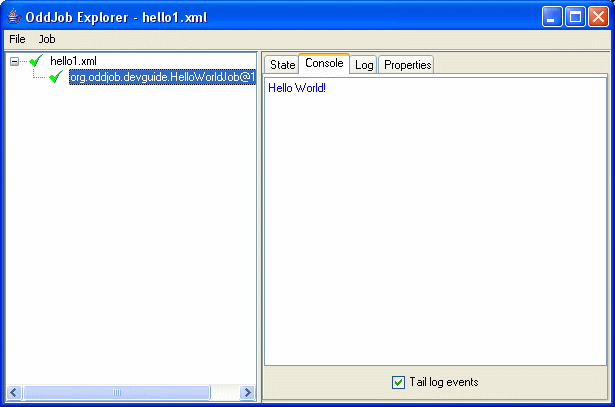
We can now also load it in Oddjob Explorer (but we need still need the classpath).
$ java -jar run-oddjob.jar -cp examples/classes
Open the file and we get:
A Job is not much use if it's not configurable, so moving quickly on lets show you how to write a configurable job.
package org.oddjob.devguide;

public class HelloPeopleJob implements Runnable {

    private String[] who;

    public void setWho(String[] who) {
        this.who = who;
    }

    public String[] getWho() {
        return who;
    }

    public void run() {
        for (int i = 0; i < who.length; ++i) {
            System.out.println("Hello " + who[i] + "!");
        }
    }

    public String toString() {
        return "Hello People";
    }
}
A quick configuration:
<oddjob>
    <job>
        <bean class="org.oddjob.devguide.HelloPeopleJob">
            <who>
                <list>
                    <values>
                        <value value="Rod"/>
                        <value value="Jane"/>
                        <value value="Freddy"/>
                    </values>
                </list>
            </who>
        </bean>
    </job>
</oddjob>
And fire it up as before:
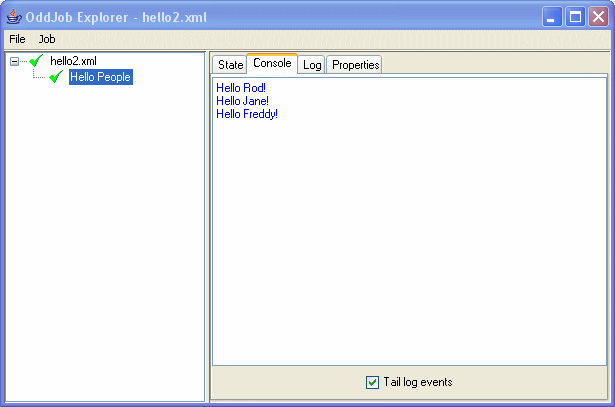
You might have noticed that this job also has a nice name. That's
because I've sneakily given our new job a toString()
method, and that's what explorer uses to label the job.
So lets take a moment to reflect on what we've got:
Not bad for a dozen lines of code.